
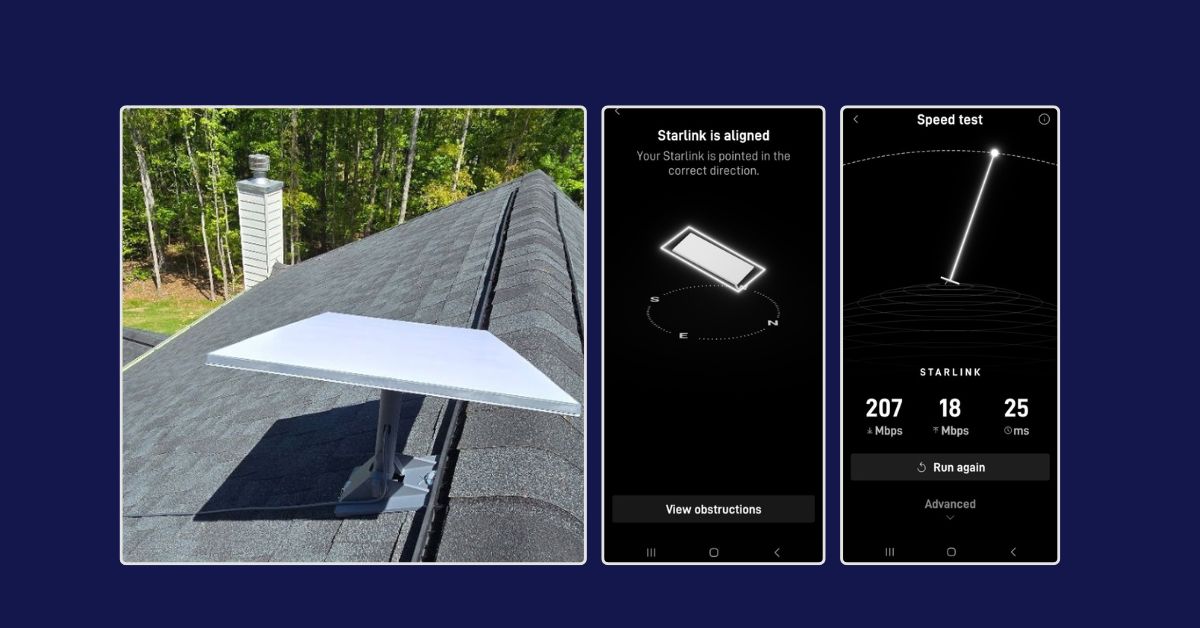
This article highlights a professional Starlink Installation in Columbus, GA. This Starlink residential installation was recently professionally completed, providing the homeowner with reliable and high-speed low-latency LEO (low-Earth-orbit) Satellite Broadband Internet access in Georgia.

For expert Starlink installation services, call 1-844-799-0258 or request a quote through our contact us Contact Us form.
Our customer from Columbus, GA, contacted ProSat Networks seeking professional assistance with installing their Starlink Standard Kit. Our Starlink SMEs performed the following
Our Starlink SMEs conducted an initial offsite assessment to evaluate the feasibility of installing Starlink at the property. This process involved analyzing satellite imagery, requesting the client with onsite photographs, and assessing the roof type alongside any potential obstructions. This thorough evaluation enabled us to systematically identify the necessary materials, equipment, suitable mounting options, and the manpower required for the installation.
Result of Initial Offsite Assessment:
🔹Property Size: 3,151 sqft, single-family home
🔹Floors: Two-story house with a basement
🔹Roof Type: Asphalt shingle roof
🔹The Starlink Equipment: Starlink Standard Kit
🔹Mount: Standard Pivot Mount
After the initial offsite assessment, we received the customer’s approval for the job order and arranged the installation schedule with our Columbus, GA Starlink installers.
Our Starlink installation team arrived on-site to perform the following scope of work:
✅Install the Starlink Standard kit using the Standard Pivot mount.
✅ Route the cable from the Starlink dish to the indoor Gen 3 Wi-Fi mesh router.
✅ Activate & configure the Starlink Gen3 WiFi mesh router.
✅Guide the customer on how to use the Starlink App.
✅Test and document the installations with photos.
To kick off the installation, we conducted a Starlink Obstructions Test using the Starlink App. This crucial step helped determine the optimal placement for the dish, ensuring a strong and reliable connection to the Starlink satellite network. The test must show a “Good Experience” rating, confirming that the selected location was well-suited for smooth streaming, browsing, video calls, and gaming.
The Starlink Standard dish was securely mounted using a Standard wall mount for maximum stability and signal reception.

We used a cable routing kit to ensure a clean, weather-resistant installation, providing proper sealing and cable management. The proprietary Starlink cable was neatly routed from the outdoor dish to the indoor Gen3 Wi-Fi mesh router, positioned in a customer-approved location to optimize WiFi coverage and signal strength throughout the home.


Using the Starlink App, we customized the Gen 3 WiFi Mesh Router by setting up the customer’s preferred network name (SSID) and password, ensuring a seamless connection.
Finally, we provided the customer with a walkthrough of the Starlink App’s key features, including:
🔹Access and manage their SSID
🔹Reset their password
🔹Run speed tests
🔹Refresh or reset the Starlink network
🔹Troubleshoot common connectivity issues
After the installation, our team performed a Starlink Alignment Test to ensure the dish was in the best possible position for continuous satellite connectivity. The process involved carefully assessing the dish’s position, considering the elevation angle, azimuth direction, and potential obstructions (such as trees, buildings, or other structures).

Then, the Starlink Speed Test was conducted to test the system’s internet performance. It’s important to note that Starlink can take up to 12 hours to synchronize with the satellite network fully.

🔹Download Speed: 207 Mbps – Excellent for streaming 4K video, video conferencing, gaming, large file downloads, and multiple devices.
🔹Upload Speed: 18 Mbps – Perfect for Zoom calls, cloud backups, social media uploads, and general online work.
🔹Latency (Ping): 25 ms– Very solid for most real-time applications like video conferencing and online gaming.
The Starlink installation project for the residential home in Columbus, Georgia, was completed successfully. It was securely installed, had a clear line of sight to the sky and was optimized for minimal obstruction.
The Starlink speed test shows a high-performance satellite internet connection with download speeds of 207 Mbps, upload speeds of 18 Mbps, and a latency of 25 ms. These results indicate a stable and reliable setup that can support bandwidth-intensive activities, such as 4K streaming, online gaming, video conferencing, and remote work. The low latency and high speeds suggest that the rooftop installation is optimal, with minimal obstructions affecting performance.
Ready for Starlink?
Call us today at 1-844-799-0258 for your free consultation on Starlink installation and IT Network Services.

🔹Starlink Installation Macon GA
🔹Starlink Installation Savannah GA
🔹Starlink Installation Athens GA
🔹Starlink Installation Sandy Springs GA
🔹Starlink Installation Roswell GA
🔹Starlink Installation Johns Creek GA
🔹Starlink Installation Albany GA
🔹Starlink Installation Warner Robins GA
🔹Starlink Installation Valdosta GA
🔹Starlink Installation Brunswick GA
🔹Starlink Installation Marietta GA
🔹Starlink Installation Gainesville GA\
Thank you for reading our Starlink installation articles.